




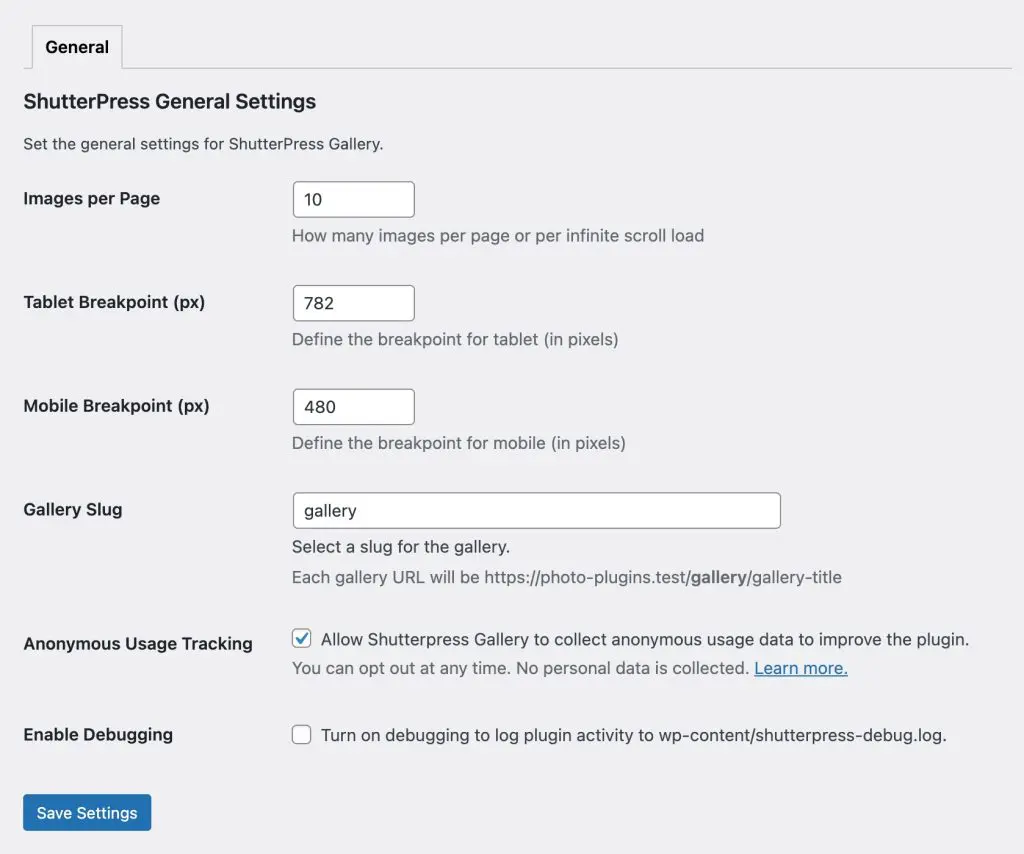
The ShutterPress Gallery Plugin includes a comprehensive settings page that allows users to customise the gallery’s functionality and appearance. This page sets the default settings for all galleries.
Below is a detailed breakdown of the settings and their usage.
Accessing the Settings Page #
1. Log in to your WordPress admin dashboard.
2. Navigate to ShutterPress Gallery > Settings from the left-hand menu.
3. Use the tabs to explore various configurable options.
General Settings Overview #
1. Images per Page #
This defines how many images are loaded on each page when using pagination or infinite scroll, you may want to increase or decrease this based on the performance of your website.
2. Breakpoints #
Set the breakpoints in pixels for responsive layouts, this is the width that sets when the galley layout changes.
• Tablet Breakpoint: Define the maximum screen width (in pixels) for tablet view.
• Mobile Breakpoint: Define the maximum screen width (in pixels) for mobile view.
3. Gallery Slug #
Set the URL slug for gallery pages to avoid any conflict with other plugins or custom post types.
Example: If the slug is gallery, the URL will be https://yourwebsite.com/gallery/gallery-title.
4. Anonymous Usage Tracking #
Turn this on and off to enable ShutterPress to anonymously track your usage of the plugin. You can read more about it here.
3. Enable Debugging #
Turning this on will record additional debugging output in wp-content/shutterpress-debug.log and also output debugging info in the developer console. WARNING: Turning this on can create a large debugging file very quickly.
Saving Your Changes #
After adjusting the settings, click the Save Settings button at the bottom of the page.
Your changes will be saved, and the galleries will reflect the updated settings.