






The best photography print store is one you own: your own WordPress site, your own galleries, WooCommerce taking the orders, and a print lab fulfilling them. You set the prices, keep the customer relationship and show the work the way you want it seen. The difficult part is rarely the shop software. It is making hundreds of photos buyable without creating hundreds of product pages. That is the problem ShutterPress Gallery is built to solve: it sells prints and digital downloads through WooCommerce using template products, so one product setup can serve a whole collection.
This guide covers what to sell, how to price it, how fulfilment works, how to run a UK-compliant shop and how event photographers can use the same site for private client proofs.
TL;DR
- Start small: six to ten strong images, two or three sizes, one paper type, with prints and downloads listed as separate products.
- Price from your true cost, not from what other shops charge: price = total cost ÷ (1 − target margin).
- Fulfilment is separate from the shop: an order can be forwarded to a lab manually or automated.
- Distance sales in the UK carry a 14-day cooling-off period, with an exemption for personalised goods.
- One WordPress site can hold your portfolio, password-protected client galleries, proofing and the shop, so clients move from proof to print order without leaving.
Table of Contents
- Print shop, print lab or your own print store?
- Show the work before you sell it
- What to sell: sizes, papers and crops
- Why template products matter for a big catalogue
- Price prints from your true cost
- Fulfilment: who prints and posts the order
- Write listings and policies that earn trust
- Event photographers: proofs first, prints second
- Putting your store on ShutterPress
- A launch checklist
- FAQ
- Sources
Print shop, print lab or your own print store?
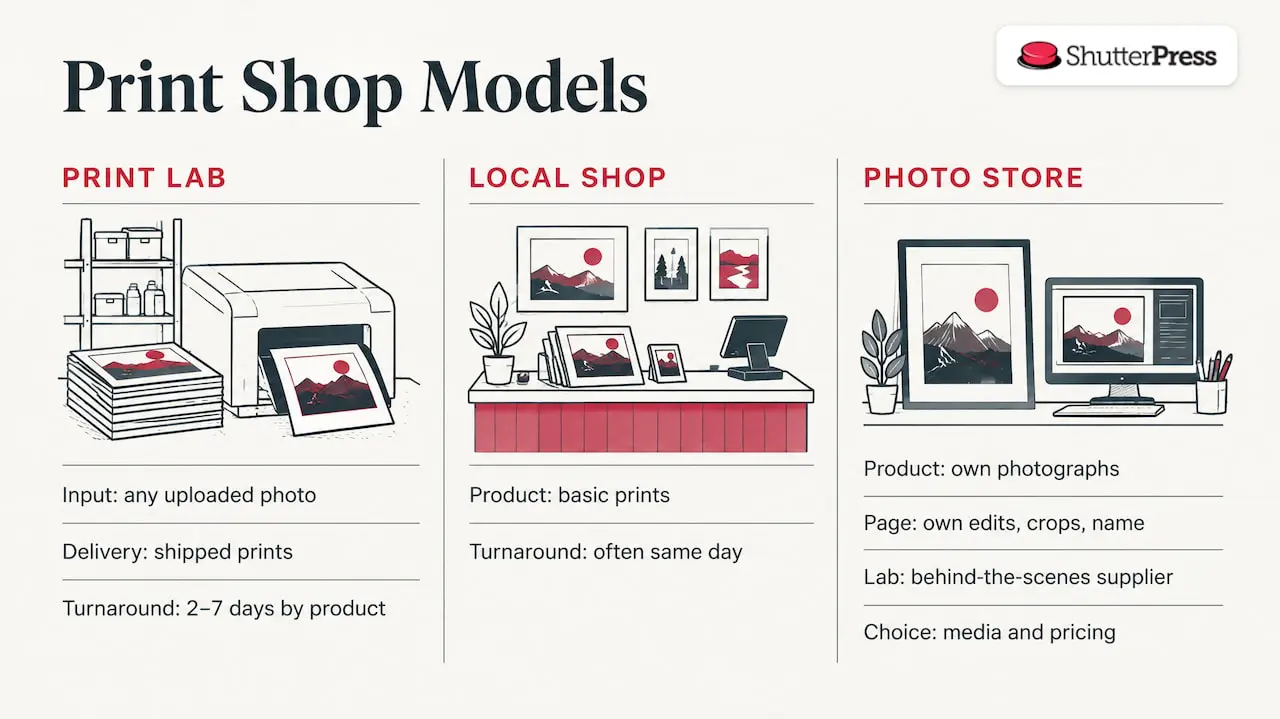
These three are easy to confuse.
A print lab or online photo-printing service produces prints for anyone who uploads a file. Wirecutter’s review of online photo printing describes the model: you upload through a web interface or app and the prints are shipped to you, with no printer or ink on your side. Labs usually take two to seven days depending on the product, while local shops often turn basic prints round the same day.
A photography print store is different: it sells your photographs, with your editing, your crops and your name on the page. The lab sits behind it as a supplier. Many fine art photographers sell directly to collectors through their own online galleries, because it lets them choose the media and the pricing for originals and high-quality prints.
On WordPress, the store is WooCommerce (the standard shop add-on for WordPress) and the gallery layer on top decides whether browsing feels like a catalogue or like an exhibition.
Show the work before you sell it
Buyers of prints are buying a picture they have lingered over. A grid of identical thumbnails and an “add to basket” button rarely does that. A few choices matter more than the rest:
- Layout that suits the images. Grid keeps a tidy catalogue, masonry suits mixed portrait and landscape work, and justified rows fill the width with no gaps. ShutterPress Gallery offers all three, and you can save a layout as a reusable template so each new collection matches the last. You can see them in the demo galleries.
- Lightbox and display effects. A large, clean view of the image is where most buying decisions happen, so the click from thumbnail to full view should be smooth.
- Watermarks on previews. Watermarking preview images is the most effective deterrent against image theft, though no online protection is total. The realistic aim is deterrence. See the watermarked gallery demo for how it looks on the page.
- Collections, not a dump. Group by place, series or subject. A visitor who lands on a coastal series should see more of it, not a mix of weddings and wildlife.
If you are still building the site itself, the guide to creating a photography website with WordPress covers hosting, themes and structure.
What to sell: sizes, papers and crops
Start with a tight collection
PrintShrimp’s October 2026 guide argues that five carefully chosen photographs can beat fifty unrelated listings. Pixcontests suggests six to ten pictures, two or three sizes and one paper type for a new shop. Both point the same way: a small, cohesive range looks curated and is easier to quality-check. You can add more once orders show what sells.
Pick sizes that suit UK buyers
UK buyers think in ISO paper sizes, and frames are made for them. Popular choices are A5 (148 × 210 mm), A4 (210 × 297 mm), A3 (297 × 420 mm) and A2 (420 × 594 mm). Two practical points follow:
- Check file size for the largest print you offer. Giclée UK says it flags files below 300 DPI before printing, so an A2 offer needs a file that genuinely holds up at that size.
- Prepare a crop for each size. An 8×10 and a 12×16 inch print have different proportions, and a landscape composed for one ratio can lose its subject in another. Keep important detail away from the edges, and inspect every crop.
Match paper to the picture
LumaPrints’ guide advises fine art paper for detail-focused work, metal for high-contrast or bold images and canvas for painterly or large-scale pieces. The principle is to let the image choose the medium, not to offer every option because it exists. Canvas also wraps the edges, so detail near the border can disappear.
Sell prints and downloads as separate products
A print and a digital file are different things with different buyers. Pixcontests recommends listing them as two products, with a one-sentence licence for the download. With ShutterPress Gallery you can sell both prints and digital downloads through WooCommerce from the same gallery.
Why template products matter for a big catalogue
In a plain WooCommerce shop, every photograph is a product: title, price, variations for each size and paper, stock settings. For ten images that is tolerable. For an event archive of two thousand frames, or a travel library built up over years, it is a job nobody finishes.
ShutterPress Gallery takes another route. It supports large photo collections with template products, so you define your sizes, papers and prices once and apply them across a gallery, rather than building a separate WooCommerce product for every photo. When you later change a price or add a size, you change the template. The details are on the WooCommerce integration page.
That is the reason a gallery-first approach suits photographers: the unit you manage is the collection, and the product behaviour follows from it.
Price prints from your true cost
Copying a competitor’s price is the quickest way to sell at a loss. Meyy’s pricing guide breaks the cost of one print into layers: lab cost, mounting and finishing, packaging, shipping, design and colour time, sales time, software, payment processing and overhead. Its formula is:
price = total cost ÷ (1 − target margin)
A worked example in pounds: if one A3 fine art print costs you £30 all in, and you want a 60% margin, the price is £30 ÷ 0.4 = £75. The same guide gives a US example of a $100-cost 16×20 print at a 60% margin selling for $250.
Two cautions on the maths:
- Payment fees are a real line. The guide puts card processing at 2.9% to 3.5% plus $0.30 per transaction as a US reference, so check the rates your own payment provider charges in pounds.
- Your time counts. Colour-matching and answering buyers’ questions are costs even when nobody invoices you for them.
If you do not yet know your overheads, the cost of doing business calculator gives you the figure to put into the formula.
Fulfilment: who prints and posts the order
Setting up the shop and producing the print are separate jobs. As Fstoppers explains, you can either automate fulfilment through an integrated service, or forward orders manually to a print provider. Manual forwarding is fine for the first orders. Automation earns its place once volume makes copying addresses a chore.
Whichever you choose, three rules save money and complaints:
- Order a proof of every picture before you launch. Look at it in ordinary room light and check crop, subject readability at viewing distance and shadow detail.
- Know the lab’s file requirements. One calibrated lab asks for TIFF or high-quality JPEG, in Adobe RGB or sRGB, at 300 PPI at the intended print size. Others differ, so read the specification of the lab you use.
- Choose a lab close to your buyers. For international sales, printing near the buyer cuts shipping costs, speeds delivery and avoids most import duty problems. For UK customers that usually means a UK lab.
Write listings and policies that earn trust
Specific beats poetic. PrintShrimp suggests a title such as “Black-and-white Brighton seafront photography print” rather than “Beautiful wall art”, and a listing that states the subject, available sizes, framed or unframed, what is included, processing and shipping times per destination, and edition terms.
Before checkout, say in plain language how long delivery takes, which countries you ship to and what happens to a damaged print. Show honest photographs of the real print, and keep a short about page so buyers know who is behind the work.
The UK rules you need to know
Selling to consumers at a distance in the UK brings a 14-day cooling-off period, and traders must tell buyers about it. Parliament’s research briefing on the regulations notes that exemptions include personalised goods. A standard print of a catalogue photograph is not personalised, so assume the right to cancel applies unless you are making something to the buyer’s specification, such as a custom crop with their name. If a case is unclear, ask Trading Standards or a solicitor, and write your returns policy accordingly.
Event photographers: proofs first, prints second
Weddings, school events, races and parties follow a different pattern: the client sees a private set, picks favourites, and prints follow. A print store alone cannot do that, but the same WordPress site can.
A workable flow, drawing on Fastio’s proofing guide:
- Cull so the client sees roughly 60 to 80% of your shots, then apply light edits.
- Organise into groups such as ceremony, reception, portraits and candids.
- Set clear selection guidelines with a deadline.
- Watermark unedited proofs.
- Share with instructions and follow up.
On the access side, Martin Kleinheinz suggests giving a couple a password-protected link with full access and download rights, and guests a separate link for viewing and ordering prints. He also advises never sending the gallery password in the same email as the link.
ShutterPress Gallery covers this on your own site: password-protected galleries for private delivery, and client photo proofing with favourites so clients can mark their choices and you can gather feedback. The proofing documentation walks through setup. Because the shop runs on the same installation, a client’s favourites can lead straight to print and download orders.
Putting your store on ShutterPress
If you want the portfolio, the client galleries and the print store in one place, ShutterPress Gallery is made for it: customisable grid, masonry and justified layouts, reusable templates, lightbox and display effects, password protection, proofing and favourites, and WooCommerce sales of prints and digital downloads. The features page lists everything, and the installation and settings docs cover getting started.
There is a free version to begin with, and ShutterPress Gallery Pro is sold as an annual subscription licence.
A launch checklist
- Six to ten images, each with a crop checked for every size.
- Two or three sizes on one paper type.
- Prints and downloads as separate products, with a one-line download licence.
- A price worked out from total cost and target margin.
- A proof print of every picture, viewed in normal light.
- Delivery times, countries served and damage policy written before checkout.
- A returns policy that reflects the 14-day cooling-off period.
FAQ
Who prints the best quality photos online?
Quality depends on the lab, the paper and your file more than on the shop name. Order a proof print of each image, check it in ordinary light, and make sure your files meet the lab’s stated resolution and colour requirements, typically around 300 PPI at the final size.
Can I sell prints on my own website instead of a marketplace?
Yes. WooCommerce handles baskets and payments, and a gallery plugin presents the work. Selling directly lets you set your own prices and papers and keep the customer relationship. ShutterPress Gallery connects your galleries to WooCommerce for exactly this.
How many photos should I list at launch?
Six to ten is a sensible start, with two or three sizes. A small, consistent range is easier to check and looks deliberate. Add more as you learn which images sell.
Do I need a separate product for every photo?
Not with ShutterPress Gallery. It uses template products, so you set up sizes and prices once and apply them across large collections instead of creating a WooCommerce product for each photograph.
Sources
- The Best Online Photo Printing Service of 2026, Wirecutter
- Photo Labs Online vs Local Shops: What Wins?
- Where to Buy Photography Online?
- Photo Delivery for Photographers 2026
- How to Sell Photography Prints Online, PrintShrimp
- How to sell your photographs as prints online, Pixcontests
- Selling Art Prints Online: Tips for Artists, Giclée UK
- Print on Demand Store: How to Start Selling Online, LumaPrints
- Pricing Photography Prints and Albums, Meyy
- How to Sell Photography Prints: Part 2, Fstoppers
- FAQs, Tricera Print
- How to Sell Photos Online: A Working Photographer’s Guide
- Photo Proofing Software: The Complete Guide for 2026, Fastio
- Research briefing on consumer contract regulations, UK Parliament



Add your first comment to this post